Hi-end Extreme

Showing posts with label Hi-endextreme. Show all posts

Sunday, April 11, 2010

Cooler Master 750 Watt GX PSU

Hi-endextremeIntroduction
When we build our computer systems, the first thing we need to ask ourselves, "What am I planning on using in my computer?" When we get our thoughts settled out on what video cards, CPU, motherboards, type and size of the memory, right down to the HDD's we are going to use. The next thing we should ask ourselves, "What PSU should I be using, that will properly power my new computer?" Tring to find that perfect balance of power and cost is not an easy task. But we all know that by getting the cheapest PSU we can get is not exactly the best option. Because these sub-standard PSU's on average cost us more in the long run, then what we paid for them.
I have seen and heard of some rather strange things on what happens on a under powered computer, or when someone uses a sub standard PSU. I seen a PSU literally blow up, I have experienced computer lock ups, unexplianed overheating of key computer components, too losing conductivity with my USB peripherals. The possiblities are endless on what can and will happen when we use a under powered computer, or when a computer uses a sub-standard PSU.
When ever someone is building a new computer, or when someone is asking for PSU advice. I normally advise the use of at least a 750 watt PSU from a reputable company. Even if they may or may not use its full potential, a 750watt PSU will give their computers the necessary power it needs, and also allow the user a bit more flexibility on future upgrades. I have used Cooler Master PSU's in my computer builds for a few years now, And I have never experienced any power related issues from these PSU's. With all of this in mind, lets give Cooler Masters newest addition of PSU's a good work out.

Features


  • Compliance with the latest Intel standard ATX 12V V 2.31.
  • Single +12V rail for the most demanding SLI configurations.
  • High efficiency design that meets 80 Plus requirements (85% typical).
  • Ultra-silent operation with intelligent 120mm fan speed control.
  • Multiple protection design (OVP/UVP/OPP/OTP/SCP).
  • High reliability (MTBF >1000,000 hours).
  • Double layer EMI Filter restrains noise and injury to end-user.
  • Huge bulk capacitor for hold up time >17ms at full loading.
  • Integrating Active PFC with PWM combo controller not only make PFC higher than 0.99, but also raises efficiency.
  • Efficient transformer for reducing 5Vsb power loss when the system is at turn-off and sleep modes.
  • Five-year warranty.

Specifications

Model RS750-ACAAE3-US

Type Intel Form Factor ATX 12V V2.31

PFC Active PFC (>0.9)

Input Voltage 90-264Vac (Auto Range)

Input Current 10A@115Vac, 6A@230Vac

Input Frequency Range 47-63Hz

Output Capacity 750W

Max. Output Capacity 900W

Fan 120mm

Power Good Signal 100~500ms

Hold Up Time >17ms

Efficiency 85% typical

MTBF >100,100 hours

Protection OVP / UVP / OPP / OTP / SCP

Dimension 150 x 140 x 86, (5.9 x 5.5 x 3.4 inch)

Operation Temperature 0~40 °C (Nominal Input Voltage)

Regulatory TUV / CE / UL / FCC / BSMI/ GOST / C-tick / CCC / KCC

Certification 80 Plus /SLI

Connector 20+4 Pin MB x1
4+4 Pin CPU 12V x 1
6+2 Pin PCI-e x2
SATA X9
4 Pin Peripheral x3
4 Pin Floppy x1

Warranty 5 year

UPC Code 884102007590

Installation

Since the Silverstone Raven RV02 chassis is a tad different from any other chassis out there (orientation wise), I had no issues mounting this PSU into this chassis and being able to hook up all of my components. I did run this PSU with a single Sapphire 5870 video card, as well as using 2 275GTX's (one primary and one dedicated Physx, because the primary card is a Gigabyte 1792 meg Super Overclock, and the secondary EVGA 275GTX is the standard 896 meg video card), for testing this PSU.

Testing Methodology

Test Setup &Testing Methodology
CPU Intel Core i5 750 Lapped
Motherboard GIGABYTE P55A-UD4P
Case SIlverStone Raven RV-02
Memory GSkill RipJaw
Video Card's Sapphire 5870 Vapor X, Gigabyte 275GTX Super Overclock+EVGA 275GTX
Hard Drives Patriot SSD 128 Gig, 2 Seagate Momentus 320 Raid 0, 1 Western Digital 160 Gig, 1 Western Digital 160 Gig E-SATA
CDRom Drive Lite On Blue Ray
Power Supply Cooler Master GX 750 watt, SilverStone 1200 watt Zeus
CPU Speeds Used 4.2GHz
Operating System Used Microsoft Windows 7 Retail
Video Card Cooler
Water and stock cooled
CPU Cooler
Modified Danger Den MC-TDX custom water cooled
Since I don't have a PSU in the wattage range of the 750 GX series PSU, so I will compare the GX 750 watt PSU to my Trusted SilverStone 1200 watt Zeus PSU. I have not had a power related issue or problems for a very long time, so testing a smaller PSU in "Minor Me" would work out to be perfect. For testing purposes, I checked all voltages on all power cables while my computer was in Idle mode, this would give me my base line performance for both PSU's. To load up the PSU's I used LynX to full load up the CPU and I would check the EPS power cable, and then the Main 24 pin power cable. I would then use 3DMark Vantage to load up the video cards to 100% then check each PCI-E power cable then rechecked the Main 24 pin power cable. all of my HDD's are SATA powered, I would move a large file of 4+ GB/s from one drive to the next, I would check the 3.3, 5, and 12 volt lines respectfully and then rechecked the Main 24 pin power cable. For the Molex power cable, I just used all of my fans on that power cable and checked the 12 volt line.
I do not have a oscillator scope or a Kill-A-Watt meter,currently. I did all my measurements with a multi meter you can purchase from any automotive/hardware store or even at Wal-Mart, all measurements were done at the power connector. There is a small margin of error, when making this type of voltage checking so your results may differ from my own. My computer and all related hardware pertaining to my computer, is behind a Monster Power Power Conditioner, this will also ensure that my wattage is consistent and that all readings are stable and consistent.

Results

Results
Power Rail Cooler Master GX 750W
SilverStone 1200W ZEUS
Idle Load Idle Load
Main 3.3v 3.41V 3.38V 3.38V 3.36V
Main 5v 5.06V 5.06V 5.11V 5.13V
Main 12v 12.40V 12.35V 12.21V 12.15V
EPS 1 12v 12.40V 12.36V 12.22V 12.18V
EPS 2 12v N/A N/A 12.21V 12.16V
PCI-E 1 12v 12.40V 12.36V 12.20V 12.18V
PCI-E 2 12v 12.41V 12.35V 12.19V 12.15V
PCI-E 3 12v 12.41V 12.35V 12.21V 12.18V
PCI-E 4 12v 12.40V 12.36V 12.20V 12.18V
PCI-E 5 12v N/A N/A 12.20V 12.19V
PCI-E 6 12v N/A N/A 12.19V 12.17V
SATA 12v 12.41V 12.39V 12.20V 12.20V
SATA 5v 5.06V 5.06V 5.12V 5.11V
SATA 3.3v 3.42V 3.39V 3.37V 3.37V
Molex 12v 12.40V 12.40V 12.21V 12.19V
Molex 5v 5.06V 5.06V 5.13V 5.13V
Looking at these results, we can see the Cooler Master GX 750 watt PSU has a slightly higher then normal out put on the 12 volt rail. Normally I see PSU's have a 12.11-12.2 volts, but this time the Cooler Master GX 750 watt PSU is putting out 12.4 volts. This slightly higher then normal out put did get my attention, but after doing the math of +/- of 5% puts this in the average range. So no real need to worry too much, as PSU's age they do tend to mellow out their voltage lines out puts. I did not notice much of a voltage fluctuation from Idle to Load times on the PSU, which is a good thing to see, as it lets me know this PSU is more then capable of handling its role of powering our most demanding computer systems of today.
Credit: www.bjorn3d.com

Saturday, March 20, 2010

Kingston HyperX 24G and CMD 24G

Kingston prepares 24GB memory kits


HyperX 1600 24GB DDR3

It seems that Kingston will answer some prayers, as this memory giant prepares to launch 24GB memory kits at Cebit. Some ultra high end users have been requesting such products for quite some time and after Cebit this crazy kit should become available.

The kit will end up branded as Kingston HyperX New 24GB 1600MHz DDR3 and as you can see it can work at 1600MHz. This memory will target X58 based chipset and we can only assume that it comes with six times 4GB memory modules but this is something that we cannot conform at press time.

Kingston believes that 24GB memory should be great for general performance and workstation applications, photo, video and 3D rendering. This memory will have its followers but it probably won’t cost pennies.
CMD24GX3M6A1333C9 - DOMINATOR, 24GB (6x4GB), 1333MHz, 9-9-9-24, with Airflow fan


Product Description

High-density 24GB Dominator kit for Core i7 systems. 1333MHz, 9-9-9-24, 1.6v

Key Features

  • Maximize your system memory capacity for the maximum performance
  • Guaranteed to work on all Intel Core i7 Bloomfield platforms
  • Matching Intel Blue Heat Sinks with patented DHX technology

Package Contents

Six 4GB memory modules tested at 1333MHz, 9-9-9-24 latency, on X58-based motherboard & Dominator Airflow Fan with 60mm fans.

System Requirements

Designed for use with Core i7 performance motherboards with three memory channels.

USD $1349.99

Credit : www.shop.corsair.com

Tuesday, March 16, 2010

PC-K62R1

Mid Tower Chassis


"Quality" is always the essence of Lancool's products, All products are manufactured in Taiwan by Lian-Li and distributed to worldwide markets.


The DragonLoad K serires builds LanCool’s high standard of Quality requirement. This SECC steel cases features a red interior with completely tool-less design are the perfect complement to a PC gamer’s needs, Use the 0.8mm SECC steel panel and high quality plastic, DragonLoad K serires is your best choise all over the market.


LanCool redesigned the internal layout for a better thermal solution, Dragon Load K62R1 uses large size cooling fans to remove the system heat faster and quieter as well as keeps the system more stable.


The cutting edge tool-less design is an important key feature in 2009 LanCool cases. LanCool designer considered end user requirements, like those who need to build systems faster, or swap out components often. The brand new tool-less modules can make users’ life much more convenient.


The idea of LanCool K serires's is from DragonLoad, design by modem way ,


The hardware installation with Dragon Load K62R1 is very easy and simple. The front panel and top panel are detachable and they can be removed without tools.


The Dragon Load K62R1 is targeted for the LAN party gamers. It is a mid-tower case, which is ideal for the latest graphics cards in combination with the best thermal dynamics. All the internal installation can be done without tools, and is easily adjustable to optimize your hardware setup. Especially in the advent of adding in new graphics cards, equipped with 8 PCI slots, can hold three or more graphics cards, supports CrossfireX™ and 3-way SLI™.


The new internal layout has the motherboard on top of the power supply unit, which allows for easier access to the motherboard as well as more room above, thus larger CPU coolers can be used. The power supply unit at the button of the case is cooled with fresh cool air directly from the outside of the case, instead of pre-heated air from within. This will bring down the core temperatures and extend the lifespan of the PSU significantly.


To install motherboard require no tools, use tool-less screw to screw a motherboard on case, easily and quickly.


The Dragon Load K62R1 is equipped with large cooling fans, with low RPM, which still provide enough air flow to cool down the hardware adequately. The front 140mm intakes red LED fan runs . The top two silent 140mm fans exhaust the hot air out, and the rear 120mm red LED fan extracts the hot air out.


The fans on the top panel are mounted with Lian Li’s new anti-vibration fan mounting system; the rubber ring grommet absorbs the vibration, keeping the case silent.


The new 5.25” bay tool-less mounting incorporates a mounting bar equipped with rubber padding. After secure the mounting bar, the rubber pad pushes and holds the 5.25” device in position to secure and absorb vibration from the device.


The too-less HDD cage combines with patented anti-vibration rubber grommets to suspend the HDD’s in a noise free environment. The two buckls on both side to hold the HDD in position, also absorb and reduce vibrations.


The aluminum PCI tool-less mounting module is equipped with a rubber pad which can hold the graphics card firmly while closing the gap found in the PCI bracket and PCI slot to reduce noise from escaping air and furthermore reduce vibrations.


The Power Supply has rubber pads for both insulation and support. The mounting clip is also aligned with rubber to reduce vibrations but also and also secure the PSU without scratching the painted surface.

There are�special air intake vents at the front of the case, allow cold air to enter , also keep system noise inside the case.

There are four rubber grommets between the HDD cage and HDD, avoid HDD directly contact the HDD cage, absorb and reduce vibrations, keep the noise down.


Dragon Load K62R1 inputs cold air by the 140mm red LED intake fan, There are also vents on the 5.25” bezels, allow cold air to enter the case to cool the system down.


The two 140mm fans on the top cover and the 120mm red LED fan at the rear exhaust the hot air out from the system. The fans cover the whole motherboard, and they can remove the heat fast.


The rear 120mm red LED exhaust fan just next to the CPU, it can remove the hot air out fast and silently.


There are vents on the PCI slots, provids extra cooling to graphics card.


The power supply unit is at the bottom of the case. It can draw in cold air directly through the vent below the power supply unit. This cooler, fresh air will keep your PSU components more cool and stable and thus extend the PSU lifecycle.


Dragon Load K62R1 supports liquid cooling system, the two holes at the rear of the case allows water tubes to pass through, and the rubber cover can protect the tubes away from cutting.


The Dragon Load K62R1 feature a high density vent design, to make sure fans remove the system hot air out of the case totally.


Fan speed controller for adjust fan speed from 800-1180RPM. User can choose the fan speed to get the best cooling or silent performance.


2009 has seen an all-new tool-less design from Dragon Load K series chassis. To do this required a great many innovative patents to be filed worldwide. The ideas will make installing and maintenance much easier. For example when installing the 5.25” optical drive, just slide the drive into the 5.25” bay, and close the mounting bar to secure the optical drive, as simple as that.


The installation of the hard disk is very easy, and tool-less. Place the hard disk into the aluminum cage, and fasten the bucks to secure the hard disk.(2.5" HDD install feasible), Slide the hard disk within the cage into the special hard disk rack with the rubber suspension grommet.


To install PCI add-on cards require no tools at all. Simply open the aluminum arm of the tool-less PCI add-on card holder, insert the add-on card to the motherboard slots, and close the aluminum arm to hold the add-on card in position. The additional rubber padding on the aluminum arm assists in gripping the card bracket and securing it firmly.


To install PSU require no tools. Simply open the aluminum PSU holder, insert the PSU in position, also can turn PSU's fans up or down to suit your need, then close the aluminum PSU holder.


The fans on the top panel are mounted with special screws with rubber ring suspension grommets. These allow easy access and removal of the fan for cleaning or service.


There is an air filter at the base of the case to stop dust from entering the case. The filter is washable. The vents are specially designed to retard heat and fire crossover should a short circuit cause sparks and excessive heat within your system. This feature is designed to prevent the problem from spreading outside your case should the unlikely event occur with your components.

The intake fans are aligned with inlet holes on the bezels. These are equipped with air filters to stop the dust and keep the internals dust free and clean.

Credit : www.lancoolpc.com

Thursday, March 4, 2010

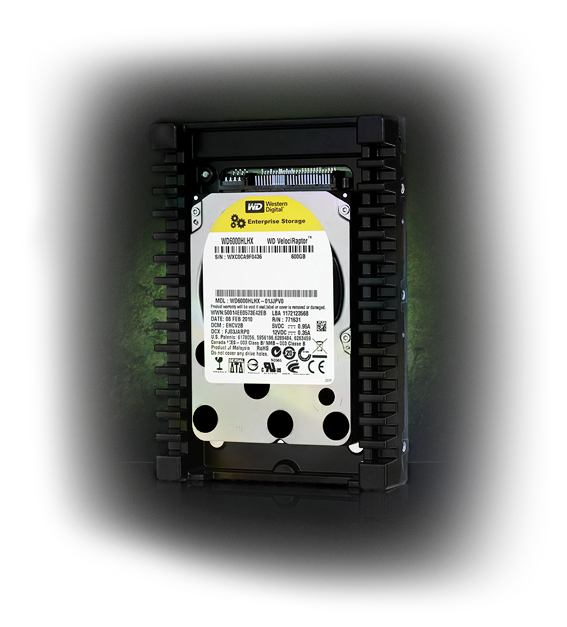
WD VELOCIRAPTOR


WD VELOCIRAPTOR


Overview

Fastest SATA hard drive

on the planet
SATA 6 Gb/s interface and 32 MB cache enhance the next generation 10,000 RPM WD VelociRaptor making it up to 15% faster than the award-winning previous generation.

Monstrous capacity

WD VelociRaptor SATA drives are available in capacities up to 600 GB, double the capacity of the previous generation.

Rock-solid reliability

Designed and manufactured to mission-critical enterprise-class standards to provide enterprise reliability to high duty cycle environments. With 1.4 million hours MTBF, these drives have the highest available reliability rating on a high capacity SATA drive.

Features

Fastest SATA hard drive on the planet
SATA 6 Gb/s interface and 32 MB cache enhance the next generation 10,000 RPM WD VelociRaptor making it up to 15% faster than the award-winning previous generation.

Monstrous capacity
WD VelociRaptor SATA drives are available in capacities up to 600 GB, double the capacity of the previous generation.
Rock-solid reliability
Designed and manufactured to mission-critical enterprise-class standards to provide enterprise reliability to high duty cycle environments. With 1.4 million hours MTBF, these drives have the highest available reliability rating on a high capacity SATA drive.


Ultra-cool operation
Consumes less idle power and uses similar active power as the previous generation WD VelociRaptor, while offering double the capacity and higher performance.

IcePack mounting frame
The 2.5-inch WD VelociRaptor is enclosed in a backplane-ready enterprise-class mounting frame with a built-in heat sink that keeps this powerful little drive extra cool when installed in high-performance desktop chassis.

Rotary acceleration feed forward
Optimizes operation and performance when the drives are used in vibration-prone,
multi-drive chassis.

NoTouch ramp load technology
The recording head never touches the disk media ensuring significantly less wear to the recording head and media as well as better drive protection in transit.

Environmentally conscious
In addition to being ROHS complaint, this generation of WD VelociRaptor is also
a halogen-free design.

5-year limited warranty


WD VelociRaptor drives devour the competition with unrivaled performance for Gaming and Video Editing.


Credit: www.wdvelociraptor.com

Sunday, February 21, 2010

Cooler Master V10 CPU Cooler

Cooler Master V10 CPU Cooler

Introduction

If one things for sure, there truly seems to be a never-ending supply of new and innovative CPU coolers at our perusal. Just when you think they've thought of everything, something completely different lands on my desk, just waiting to be punished. Luckily, the excitement of pushing the latest releases to the brink of meltdown has yet to leave me.
I have quite often pondered just how heat removal capacity could be harnessed with air-cooling designs. Cooler Master has established a strong and solid presence in the aftermarket cooling world, and having been around for 10+ years, it is not hard to see their highly-focused efforts in providing strong and dependable cooling solutions. From heat sinks and fans to full-featured PC towers, they have something for everyone.
On my desk today is the V10 CPU cooler. With 10 heat pipes, dual fans and a variable TEC plate (Thermoelectric cooling) there is no doubt as to the purpose of this monster: rip as much heat as possible out of your processor. This is Cooler Master's first TEC hybrid design and they have taken a different approach by pairing up this potent technology with air cooling.

Closer Look

Considering that I was already well-aware of the specifications of the V10, I must admit that the sheer size of it still makes my eyes bulge. Once out of the box, I got my first glimpse of the beast in all its glory. The large full cover shroud grabs your attention with its chrome detailing. This thing is a monster.
Flipping it around we get a glimpse of the TEC controller and the fan wiring. I really appreciated the fact that the fans are wired together keeping the clutter down to a single 4-pin PWM-capable connector which can find its home directly on your motherboard header. This angle also gives you a better look at the TEC.
Looking down at the top exposes the down-blowing fan which not only blows across 4 of the large heat pipes but also your motherboard. Most if not all motherboard designs place the memory squarely in this area as well as the CPU power circuitry, so the double-duty nature is a nice touch. The fan grill is solid and will protect anything that may try to come in contact with the fan.
Rolling it onto its side we now see the belly of the beast. There is another large surface area section with 2 more heat pipes protruding upwards. A second 120mm fan is ready and waiting to blow across this area and out towards the back of your case. Four of these pipes terminate in the bottom layer of the TEC sandwich. I appreciate the attention to detail and the very good build quality exhibited here.
By adjusting the angle in this next photo you get a better sense of how the heat pipes are oriented. The bends are quite smooth and almost ripple free. The TEC plate gets its power from the control module that resides directly over the CPU contact area.
Moving closer to the front allows us to take a better look at the heart of the V10. The pipes are laminated to the plate on the lower half of the TEC.
Peeling off the protective plastic from the mounting area allows us to check it for flatness and finish. I checked flatness with a metal ruler and found it to be nearly perfect and the finish itself was quite smooth. While it is not a mirror finish by any means I could not feel any imperfections at all. The protective layer did its job very well.
Included hardware was extensive and will allow use on virtually any platform available. The instruction sheets were very thorough. While it would have been nice to get a bit more, you get enough thermal paste to perform a single install.
So with that said, let's see how this beast will fit into our testing machine, and also check out some results, followed by my final thoughts.

CoolIT ECO A.L.C. Liquid CPU Cooler


Introduction

The search for the perfect cooling solution for that new PC you're building never seems to end. Every manufacturer vouches to have the most efficient, quietest and cheapest solution available, and if we merely took their word for it, there would be no need to shop around.
As of late, advertising has reached an unprecedented level with the overwhelming popularity of the Internet and people's ability to research a product down to its very last detail. Some days I almost (and I do mean almost) wish that we were not bombarded with so much information as it does lead to sensory overload causing even the simplest decision to be nearly impossible to make!
Whether you're choosing air or water cooling, there is one simple fact that always comes to the head of the pack: simplicity is a MUST. No one wants to go to be forced to go to engineering school to learn the proper way to install a CPU cooler and they want it to just work straight out of the box with little tinkering. While the enthusiast market is growing day by day with people becoming ever braver to try more difficult installs, there is still only a very small segment of the market willing to put in the effort, and rightfully so.
CoolIT has specialized in PC cooling and has products to cover pretty much any area of the current market. From TEC-based monsters to the venerable all-in-one water cooling solution, CoolIT has been very busy in doing its homework and listening to its customers to make sure it's in tune with what is expected in current products as well as future releases. Having tested its products before I can attest to the fact they do build quality stuff with a strong attention to detail and performance.
Today we get a look at the ECO A.L.C (Advanced Liquid Cooling). There was a time no so long ago that all-in-one solutions were scoffed at without a thought and were nearly ineffective and costly as well. Thankfully, that day is in the past and with releases such as the CoolIT Domino and the very successful Corsair H50 people are forced to take a long hard look at these types of coolers. I have said it many times in the past, water cooling is nearly unsurpassed with its ability to remove tremendous amounts of heat load without falling victim to heat soak. Multi-core processors have the uncanny ability to push their cooling solutions to their limits while overclocking pushes many past the point of failure.
With a simple design, CoolIT is once again setting the stage for another budget water vs. high-end air cooling battle. While we are not directly comparing the ECO to any air solution, we will give you all the facts you need to make the decision as to which way you should go for your next build. When the dust settles, I feel you just may be surprised at the results, so with no further ado, let's get the ECO A.L.C. out of its box and onto a CPU and let parts do the talking.


Closer Look

Shipped in a rather plain and colorless black and white box, the ECO is well packaged and protected in a solid foam clamshell. Just for giggles I even sat down on the box and it held all 200lbs of my weight without feeling like calamity was imminent. Once out of the packaging and onto the table we see that we are given a simple yet elegant cooling solution. The quality is readily apparent and without a doubt you can see the engineers did their homework.
Focusing in on the pump/cup block once again shows off the clean lines and styling. The shroud has the CoolIT logo and part name printed on it and you can also see the simple yet effective thumbscrews used to attach it to the CPU socket. Should you prefer it, the screws are also able to be fastened using a Philips style screw driver.
The radiator is compact and has a solid feel. There is no flex in the metal and the finish is excellent. All of the connections are firm with no play so there is no worry the hoses could come loose once installed inside your case. To me, this is the main appeal of a pre-filled water cooling solution as most people are far too afraid of leaks when contemplating a custom-built water cooling loop.
While we are not given the exact specs of the included fan, I was happy to see it was of the 4-pin PWM style, meaning it will be able to be finely controlled by the motherboard's BIOS as nearly all current motherboards have very effective fan control features built in. This will further enhance the effectiveness while helping maintain quiet levels, should that be within the desired operating parameters.
The base of the High Performance FHE (Fluid Heat Exchanger) has micro channels that help maximize cooling potential. It also sports pre-applied thermal paste so you can skip the often messy step of applying it yourself. Also take note of the simple multi-mount tabs. All you have to do is pull up on the thumbscrew to slide the tabs into the position needed for your socket. I think this innovative design feature is top-notch and far better than shipping multiple brackets for the 3 main Intel sockets.
Here we see the rest of the included hardware which comprises the many back plates for the 3 Intel sockets as well as the required mounting tabs for AMD sockets and also the respective back plate. Four screws and a simple installation guide round out the included parts.
I cannot emphasize just how much the simplicity of this design impresses me. While I have built many custom water loops for my personal PC over the years, it was still a daunting task which took days to do properly. This sleek design is sure to be a big hit with the mass market as long as it works as well as it looks.
Now that we have shown you the goods, it's time to get it installed and see just what it's made of.

Tuesday, February 9, 2010

ATI Radeon HD 5970 2G Extreme

ATI Radeon HD 5970 Review: Dual-GPU Graphics


ATI revealed its last generation Radeon 5000 graphics family last September, when we got the chance to review the ATI Radeon HD 5870, and what a treat that was.
In a few tests the single-GPU Radeon HD 5870 was able to outgun the mighty GeForce GTX 295, while in most it managed to match or improve upon the Radeon HD 4870 X2. As you are likely aware, both of these products carry dual GPUs, which bring a number of implications, not to mention bigger price tags.
Looking forward we knew Nvidia would have no immediate response to the new Radeons, while on the other hand ATI was not done unleashing its full series of products. Subsequently we looked at two more products that were meant to underperform the flagship HD 5870: the slightly cut down Radeon HD 5850 and the mainstream aimed HD 5770.


From left to right: Radeon HD 5770, HD 5850, HD 5870, and HD 5970.
But as we discussed in our preliminary Radeon 5870 review, on the horizon was also a follow-up to the Radeon HD 4870 X2, code-named "Hemlock XT", which in essence would put together a pair of Radeon HD 5870 GPUs on a single PCB.
Today AMD is officially unveiling the Hemlock as the new ATI Radeon HD 5970, hoping to expand its current dominance in single-GPU performance with the fastest single-slot graphics card on the market -- a title that until today was reserved for Nvidia's dual-GPU GeForce GTX 295.
The Radeon HD 5970 looks to be well suited for the job. The GPUs used in this card use exactly the same configuration found on the Radeon HD 5870, while core and memory frequencies match those of the Radeon HD 5850. This provides the HD 5970 with an unmatched memory bandwidth of 256GB/s.
All this horsepower will come at a hefty price, as AMD expects to charge as much as $600 for it. This is a bit hard to swallow, but all things considered it's about where we expected it to stand among the rest of high-end graphics offerings.


Full exposure: A "naked" Radeon HD 5970 graphics card.
The $400 Radeon HD 5870 is still sold out virtually everywhere due to extreme shortages. The Radeon HD 5850 version still costs $300, meaning that a pair of them would cost the same amount as a single Radeon HD 5970, and we do not expect the performance to be nearly as good. On the other side of the equation, Nvidia's top performer, the GeForce GTX 295 is selling for around $500.
As we see it, only extreme users looking for the best possible gaming experience - or the bragging rights attached to the label - will find the Radeon HD 5970 to make complete sense.
Knowing this is the 5970's intended market, AMD has stamped a big "unlocked" label over the card in our press kit. Perhaps more marketing buzz than actual functionality, the Radeon HD 5970 allows you to jack core and memory frequencies as high as you like -- or at least as high as they will go without compromising stability. This in itself is far from exciting news as there's been software available to do just that for ages.
The most interesting part should come from the ability to adjust voltages and thus increase the card's overclocking room, something we'll be checking in detail next.
Radeon HD 5970: The Card In Detail
The Radeon HD 5970 is a truly massive graphics card, even for a high-end dual-GPU product. Its dimensions whale anything previously seen, measuring in at 30cm long and weighing a little over 1kg.
Our review sample hung a total of 6cm off the edge of our Asus P6T Deluxe motherboard used for testing.


Cooling the Hemlock XT GPUs is a large aluminum heatsink made up of 36 fins. Measuring 16cm long, 7cm wide, and 2.5cm tall, it is slightly larger than that used in the Radeon HD 5870. Connected to the base of this heatsink is a massive copper plate which helps improve efficiency, while a 75x20mm blower fan draws air in from within the case and pushes it out through the rear of the graphics card.
For the most part this fan operates very quietly, helped by the impressively low 42 watt idle consumption of the Radeon HD 5970. When gaming, the fan will inevitably spin up as the card can consume up to 294 watts under load, but even with the increased thermal stress the 5970 does not scream at intolerable levels.


The heatsink and fan have been enclosed within a custom built housing that conceals the entire graphics card, which is the same design used with the Radeon HD 5870. This setup helps protect the card very well; Nvidia has been using similar enclosures for some time with their most prized graphics cards, such as the GTX 295.


Removing the heatsink exposes the two GPUs, GDDR5 memory chips, and a few other critical components.
With the heatsink off the Radeon HD 5970 looks almost identical to the Radeon HD 4870 X2, though it is noticeably longer.


Key changes involve the new GDDR5 memory, improved power circuitry, and an updated 2.0 PEX bridge from PLX Technologies, used to link the GPUs together. All this hardware is cooled via the large heatsink that covers the majority of the card’s 30cm long PCB.
GDDR5 memory works at an ever more impressive frequency (1.0GHz x 4) on this particular model, which features a total capacity of 2GB. The core configuration of the Radeon HD 5970 doubles everything in the 4870 X2 with 1600 (320x5) SPUs, 80 TAUs (Texture Address Units), and 32 ROPs (Rasterization Operator Units).


AMD’s reference card came equipped with Hynix ICs (H5GQ1H24AFR-T2C parts). These GDDR5 modules are rated for 1.25GHz operation, so we expect to push them beyond the stock 1.0GHz configuration without hassle.


In order to feed the graphics card enough power, a pair of PCI Express power connectors are used (6-pin and 8-pin sockets). This is the same configuration used by previous dual-GPU graphics cards such as the GeForce 9800 GX2 and Radeon HD 4870 X2, so current high-end power supplies should cater for this new graphics card.


The Radeon HD 5970 naturally supports CrossfireX technology, and therefore in the standard position we find a single connector for bridging two cards together.
The only other connectors can be found on the I/O panel. Our sample featured two dual-DVI connectors and a Mini Display Port connection. Just like the Radeon HD 5870, the 5970 can support a maximum resolution of 2560x1600 on not one but rather three monitors.


Test System Specs & 3Dmark Vantage
Core i7 Test System Specs
- Intel Core i7 965 Extreme Edition (Overclocked @ 3.70GHz)
- x3 2GB G.Skill DDR3 PC3-12800 (CAS 9-9-9-24)
- Asus P6T Deluxe (Intel X58)
- OCZ GameXStream (700 watt)
- Seagate 500GB 7200-RPM (Serial ATA300)
- ATI Radeon HD 5970 (2GB)
- HIS Radeon HD 5870 (1GB)
- HIS Radeon HD 5850 (1GB)
- HIS Radeon HD 5770 (1GB)
- VisionTek Radeon HD 4870 X2 (2GB)
- Asus Radeon HD 4890 (1GB)
- Palit Radeon HD 4870 (1GB)
- Asus GeForce GTX 295 (1792MB)
- Asus GeForce GTX 285 (1GB)
- Asus GeForce GTX 275 (896MB)
- Palit GeForce GTX 260 (896MB)
Software
- Microsoft Windows 7 Ultimate (64-bit)
- Nvidia Forceware 191.03
- ATI Catalyst 9.10


Already the Radeon HD 5970 is starting to look impressive. With a 3Dmark score of 9238pts at 2560x1600, it has not only set a new record for single PCB graphics cards, but also managed to outperform both the GeForce GTX 295 and Radeon HD 5870 by comfortable margins of 37% and 48% respectively.
Furthermore the previous generation AMD flagship card, the Radeon HD 4870 X2, was blown away by a 62% margin. We're eager to see how this numbers translate into real-world gaming performance.


Benchmarks: Unreal Tournament 3, Batman Arkham Asylum


While the Radeon HD 4870 X2 and Radeon HD 5770 Crossfire both showed impressive gains over their single GPU counterparts, the new Radeon HD 5970 struggled to outpace the Radeon HD 5870.
At 2560x1600 it was just 10% faster, which is a bit worrying considering how the game’s engine has typically worked well with Crossfire technology. Hopefully this won’t become a trend throughout the rest of our tests.


Batman Arkham Asylum is a controversial game to benchmark with, as anti-aliasing in this game strongly favors Nvidia based graphics cards. By removing this visual setting the problem is easily eliminated, though it brings about another small problem: even at 2560x1600 mid-range graphics cards are not exactly put to the test.
The game is also based on the aging Unreal Engine 3, though it is said to use the 3.5 version which features a few upgrades. Still, this shouldn’t provide much trouble for the Radeon HD 5970.
Despite not being a particularly demanding game, Batman Arkham Asylum should demonstrate how various graphics cards scale using this engine -- and the Radeon HD 5970 cleans up. At the maximum tested resolution the Radeon HD 5970 is 27% faster than the GeForce GTX 295 and 58% faster than the Radeon HD 5870. Obviously with an average of 168fps the Radeon HD 5970 has no problems with Batman Arkham Asylum using maximum in-game quality settings with AA/AF disabled.


Benchmarks: Section 8, The Last Remnant


Section 8 is another game based on the original Unreal Engine 3, and again while other Crossfire setups show reasonable performance gains, the Radeon HD 5970 was just 9% faster than the Radeon HD 5870 at 2560x1600. Although this did make the Radeon HD 5970 the fastest graphics card tested, we are hoping to see significantly larger performance gaps between it and its single GPU version.


In The Last Remnant, our last test using the Unreal Engine 3, we see a decent performance margin favoring the Radeon HD 5970 when compared to the Radeon HD 5870. At 2560x1600 the card was 58% faster than the Radeon HD 5870, while it also managed to edge out the GeForce GTX 295 by a 15% margin.
Benchmarks: Wolfenstein, Enemy Territory: Quake Wars


Wolfenstein is one of the newer games in our review and it uses a heavily modified version of the id Tech 4 game engine. At 2560x1600, we were pleased to see that the Radeon HD 5970 was 52% faster than the Radeon HD 5870. This also meant that the Radeon HD 5970 was 43% faster than the GeForce GTX 295 and 52% faster than the Radeon HD 4870 X2. With an average of 93fps at this extreme resolution, the Radeon HD 5970 managed to make the GeForce GTX 295 look slow.


Enemy Territory: Quake Wars employs the original id Tech 4 game engine. Despite it being quite old and testing with maximum in-game quality settings as well as 8xAA/16xAF enabled, the Radeon HD 5970 averaged a staggering 158fps at 2560x1600. This translated to a 49% performance margin over the Radeon HD 5870 and 55% over the Radeon HD 4870 X2.

Power Consumption & Temperatures


In terms of power usage the Radeon HD 5970 is hungry, which was to be expected. With a total system consumption level of 498 watts, the Radeon HD 5970 used slightly less power than the Radeon HD 4870 X2, while consuming 8% more than the GeForce GTX 295.
The Radeon HD 5970 does only use 26% more power than the Radeon HD 5870, which we found startling.


The operating temperature of the Radeon HD 5970 is well within acceptable levels, with an idle temp of 60 degrees. Under load the card heated up to 87 degrees. This stress temperature placed the Radeon HD 5970 alongside the GeForce GTX 275 and the Radeon HD 5870.
The surprising part is that under load the Radeon HD 5970 appeared to generate roughly the same amount of noise as the GeForce GTX 275 and Radeon HD 5870 graphics cards.
Overclocking Performance

Adding value to the Radeon HD 5970 are its stock overclocking abilities that helped us squeeze almost 20% more performance out of it at 2560x1600. The ability to adjust the voltage of any Radeon HD 5970 card should come as a bonus to enthusiast-level consumers and extreme gamers, though we hope AMD is working on providing better software for the consumer.
Although we finished off with a 25% core and memory overclock, it came far from easy using a beta version of the Catalyst drivers. After what seemed like endless stuffing around we achieved a stable overclock with the core running at 900MHz and the memory at 1250MHz.


Overclocking improved the 3Dmark Vantage score at 2560x1600 by 20% as the Radeon HD 5970 was awarded 11099pts. This made the Radeon some 65% faster than the GeForce GTX 295, which was the next fastest graphics card tested.


Company of Heroes Opposing Fronts allowed for a 17% performance increase at 2560x1600 when overclocking the Radeon HD 5970.


The only other game we had time to test after finally achieving a decent overclock was S.T.A.L.K.E.R.: Call of Pripyat where we saw healthy performance gains again. The performance at 2560x1600 was increased by 18% making the Radeon HD 5970 around 78% faster than the Radeon HD 5870.

Final Thoughts

As expected the Radeon HD 5970 is vastly superior to the GeForce GTX 295 in terms of performance beating it in every single test, at all tested resolutions.
On average the Radeon HD 5970 was 53% faster than the GeForce GTX 295 at 2560x1600. Even removing the top three tests where the Radeon led with the biggest margins (BattleForge, Enemy Territory and Street Fighter IV), the HD 5970 still ended up some 34% faster than the GTX 295.
It's easy to conclude from there that the Radeon HD 4870 X2 presented no contention whatsoever, and that ATI's latest dual-GPU Radeon can claim the title of the fastest graphics card currently in the market.
Another interesting statistic is that the Radeon HD 5970 was on average 46% faster than the Radeon HD 5870, while costing 50% more. Assuming that you can increase the core frequency of the Radeon HD 5970 by at least 17% and the memory by 20%, then you can effectively produce a pair of Radeon HD 5870 GPUs in a single board. Once again, for those who can justify the price, we feel that the Radeon HD 5970 provides enthusiast users with a viable alternative towards extreme performance.
It should be noted that under load the Radeon HD 5970 operated at an acceptable volume when running at its default specifications, but this wasn't the case when overclocking. In order to keep the GPUs at safe temperatures, the blower fan was working overtime and in the process created so much noise it was impossible to hear myself think. Those looking into overclocking the already super-fast Radeon HD 5970 will need to delve into alternative cooling methods such as water.
The Radeon HD 5970 is also the largest graphics card we've ever tested with a length of 30cm, it's larger than the 4870 X2 or the GTX 295. This card is not going to be compatible with a wide range of computer cases, so those looking at purchasing it should first make sure their case can accommodate for the EATX (extended ATX) form factor, which measures 30.5cm wide, or roughly the same dimension as the Radeon HD 5970.
Like all multi-GPU graphics cards, the Radeon HD 5970 relies heavily on driver support to perform as intended. Every time a new game is released it is likely that the Radeon HD 5970 will not fully support it (taking advantage of the two GPUs) until AMD updates the Catalyst driver. I'm usually skeptical about multi-GPU technology as the results tend to vary a lot, though admittedly things have improved considerably from where we were a year ago.
Without full Crossfire support the Radeon HD 5970 will perform somewhere in between a single Radeon HD 5870 and 5850 graphics card, which is still pretty decent.
Make it official, the Radeon HD 5970 is the fastest graphics card in the market, outperforming by a long shot previous generation dual-GPU products. We can't decide for you whether it makes sense to spend $600 on this graphics card or not, but at least it's nice having the option.
The next step for AMD/ATI is not to work on their next-generation products, as it is making sure the current Radeons are widely available from retailers. We sure hope the Radeon HD 5970 does not become a soft launch, following the inventory debacle seen with the rest of the series. So, inventory first and working around the drivers' rough edges should make this a great purchase for those who can afford it.

Credit : www.techspot.com


Labels

computer article (4) Hi-endextreme (8) Knowledgeable the Computer (3)